 BlueCheckOpen BlueCheck
BlueCheck text messages
BlueCheck texts the people who use the BlueCheck app about their own account, from 1-866-594-2583. Texts are optional: you sign up in the app, and you can stop them at any time.
What we text
- Reminders about your own work, such as a task that is due or a timer left running.
- Alerts about your BlueCheck account.
- One-time sign-in codes.
- Replies from the BlueCheck assistant, when you text it to clock in or out, log time or check a project.
We never send marketing texts, and we text only people who signed up. Message frequency varies with how you use BlueCheck.
How to sign up
- Sign in to BlueCheck at app.bluecheck.tech and open Settings > Profile.
- Under Text messages, enter your mobile number.
- Read the words beside the box and tick it. The box is never ticked for you, and you do not need texts to use BlueCheck.
- Choose Send code. We text a 6-digit code to that number, so only the person who has the phone can sign it up.
- Enter the code and choose Turn on texts. Texts start only then, with one that confirms you signed up.
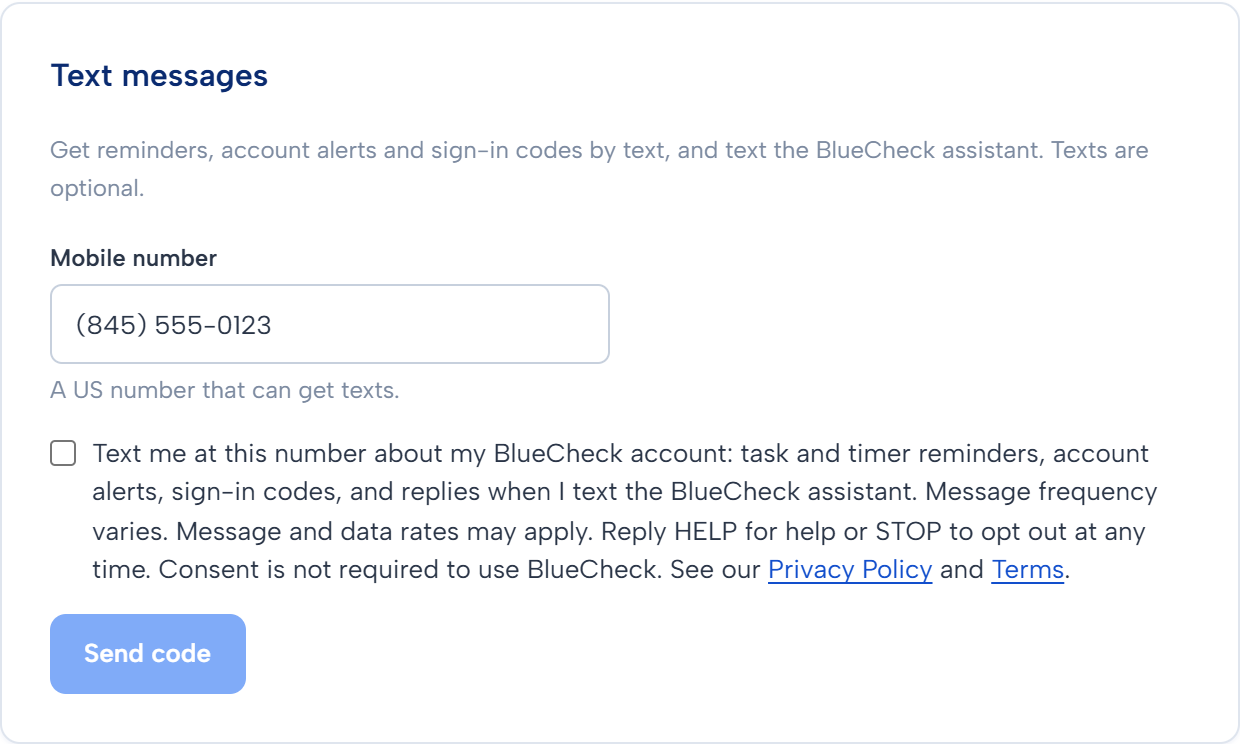
The words beside the box
"Text me at this number about my BlueCheck account: task and timer reminders, account alerts, sign-in codes, and replies when I text the BlueCheck assistant. Message frequency varies. Message and data rates may apply. Reply HELP for help or STOP to opt out at any time. Consent is not required to use BlueCheck. See our Privacy Policy and Terms."
The text that confirms you signed up
"BlueCheck: You are signed up for account texts. Msg frequency varies. Msg & data rates may apply. Reply HELP for help, STOP to opt out."
How to stop
Reply STOP to any BlueCheck text, or text STOP to 1-866-594-2583. END, CANCEL, UNSUBSCRIBE, QUIT, REVOKE and OPT OUT work too. You get one text that confirms it, then nothing more.
You can also turn texts off in Settings > Profile > Text messages.
To get texts again, reply START.
Help and costs
Reply HELP to get our contact details by text: "BlueCheck: For help, email support@bluecheck.tech or visit app.bluecheck.tech. Msg frequency varies. Msg & data rates may apply. Reply STOP to opt out."
Or email support@bluecheck.tech.
Message and data rates may apply: your phone plan decides what texts cost you. Carriers are not liable for delayed or undelivered messages.
Your number and your privacy
We use your mobile number only to send the texts you signed up for and to answer the texts you send us. We do not sell your number. We do not share your number, or your agreement to get texts, with third parties or affiliates for their marketing.
The privacy policy says what we keep and for how long, and the terms cover texts too.
Who sends these texts
BlueCheck Technology, a trade name of Family Fund Inc. Email support@bluecheck.tech.